BitTorrent is an ideal peer-to-peer (P2P) distribution method for large open-source projects such as Linux operating systems (Ubuntu, Debian, Arch Linux), application installers (LibreOffice, Blender), or public AI datasets. This method significantly reduces server bandwidth costs for development teams and increases download speeds for users.
However, downloading files from P2P networks also carries cybersecurity risks if the torrent file is published by an unidentified third party. Malicious actors can alter installers, attach malware or backdoors, or create fake files on public indexers. Therefore, verifying the official authenticity of a torrent file or Magnet link before downloading is a mandatory security step.
Why Verify the Official Torrent Source of an Open-Source Project?
Benefits of Torrents in Distributing Large Files
For files larger than several gigabytes, traditional client-server models are prone to bandwidth congestion when new updates are released. BitTorrent distributes the network load: every downloader simultaneously becomes a sharing server (Seeder) for others.
Risks of Unofficial Torrent Files on Public Trackers
When searching for torrent files on open indexers, you easily encounter tampered files. An altered operating system ISO image may come pre-loaded with cryptocurrency miners, keyloggers, or disabled default security features.
4 Methods to Check the Authenticity of a Torrent File
To determine whether an open-source project officially supports BitTorrent distribution, follow these 4 standardized check steps.
1. Inspect the Official Download Page and Mirror List
All reputable projects publicly disclose their download methods directly on their main homepage or under the “Download / Get It” section.
- Key indicator: Alongside direct HTTP/HTTPS download links for
.iso,.zip, or.tar.gzfiles, the homepage will provide download links for.torrentfiles ormagnet:?xt=urn:btih:links. - Link structure: Official torrent download buttons usually point directly to the project’s root domain (e.g.,
releases.ubuntu.comortorrent.archlinux.org) rather than an unfamiliar intermediary website.
If the download page only provides traditional HTTP/FTP links without any Torrent icon or .torrent file, the project most likely does not distribute via P2P networks.
2. Inspect Assets in GitHub Releases and GitLab Releases
Most open-source projects today manage source code and packaged releases on GitHub, GitLab, or Forgejo.
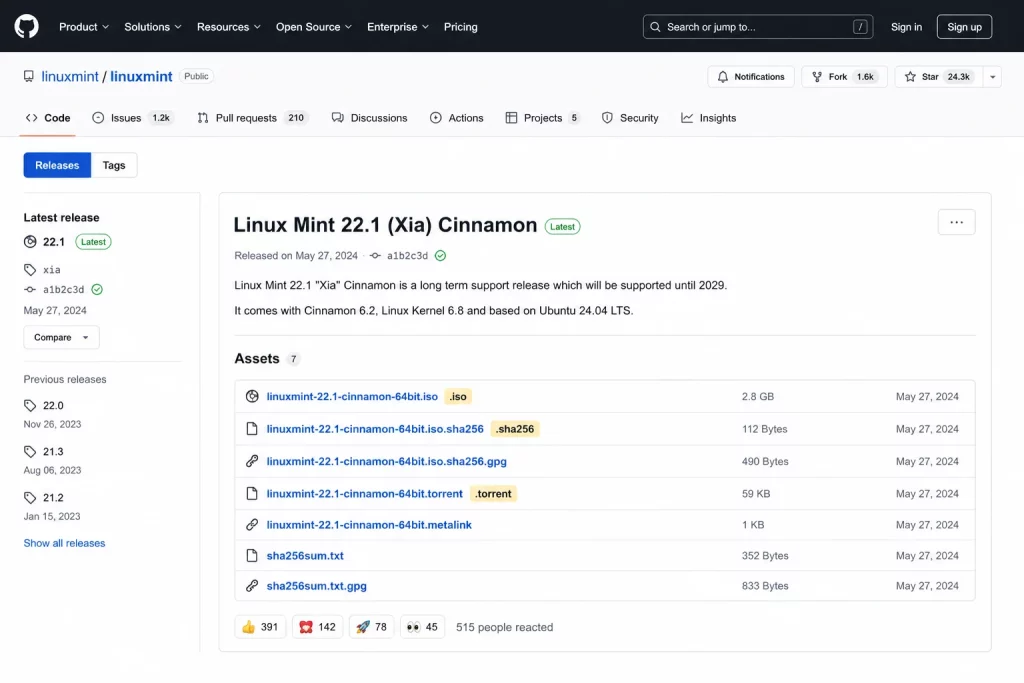
- How to access: Navigate to the project’s official repository and go to the Releases section (usually located in the right sidebar or under the Code tab).
- Check Assets: Each Release comes with a list of packaged files (Assets). If the project officially distributes via torrent, you will see files ending in
.torrentor a text file containing Magnet URIs right inside the Assets list. - Read Release Notes: Some developers do not attach
.torrentfiles directly to Assets but insert links pointing to their torrent mirror servers in the release description. Read this description carefully to find official links.
3. Consult Documentation, Wiki, and Web Seed Lists
Many projects maintain separate documentation pages (Wiki / Documentation) to guide users on efficient downloading.
- Search terms: Visit the project’s Wiki page and look for sections like “Mirrors”, “Alternative Downloads”, or “BitTorrent Distribution”.
- Confirm Web Seed servers: Official torrent files often integrate Web Seeding (HTTP Seed) mechanisms. This allows BitTorrent clients to download parts of data directly from the project’s official HTTP server when the number of P2P seeders is low.
If the project documentation lists official Tracker URLs (e.g., [torrent.ubuntu.com:6969/announce](https://torrent.ubuntu.com:6969/announce)) or instructions for using a torrent client, you can use it with complete confidence.
4. Verify GPG Digital Signatures and Hashes (SHA-256)
Even if you obtain a torrent file from an external source or a community forum, you can still verify if the data inside strictly matches the original using a checksum.
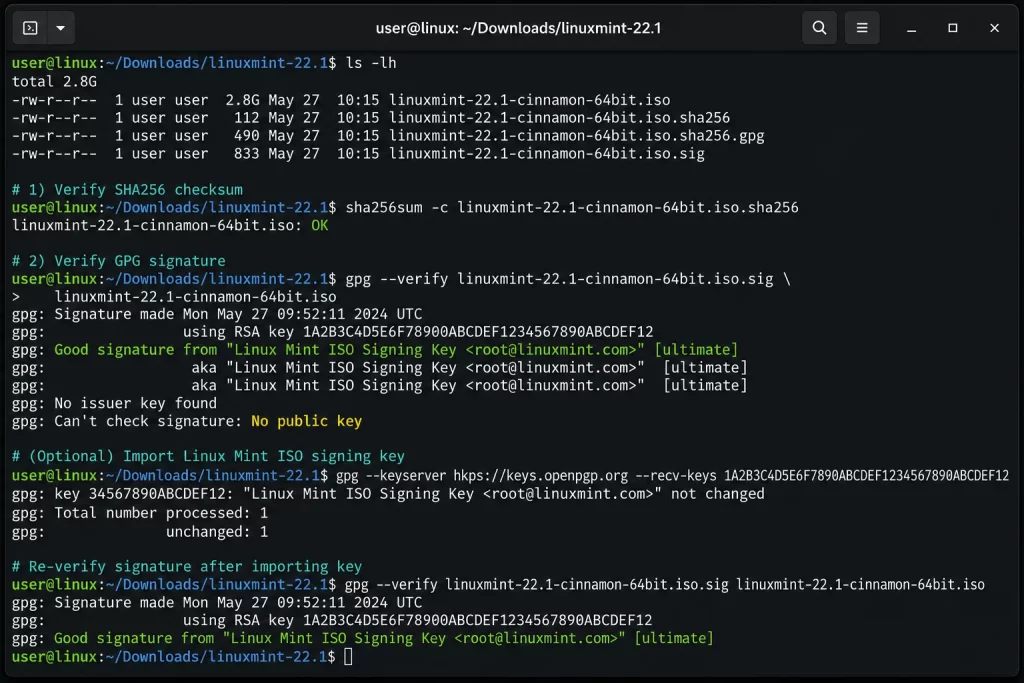
- Download the official Checksum file: Access the project’s homepage and download the official checksum file (usually named
SHA256SUMS,SHA512SUMS, orMD5SUMS). - Compare checksum after download: After completing the data download via torrent, run a verification command on your computer (e.g.,
sha256sum file.isoon Linux/macOS orCertUtil -hashfile file.iso SHA256on Windows). - Verify GPG signature: For projects requiring high security, developers provide additional
.ascor.sigsignature files. Use GPG tools to verify that this signature was signed by the developer’s official Public Key. If the checksum and GPG signature match completely, the data downloaded via torrent is 100% genuine and safe.
What to Do When a Project Does Not Provide an Official Torrent
If you have gone through all the steps above and confirmed the project does not distribute via BitTorrent, apply the following safe alternative solutions instead of looking for torrent files on unverified websites.
Utilize Multi-Threaded Downloaders (Aria2, Download Managers)
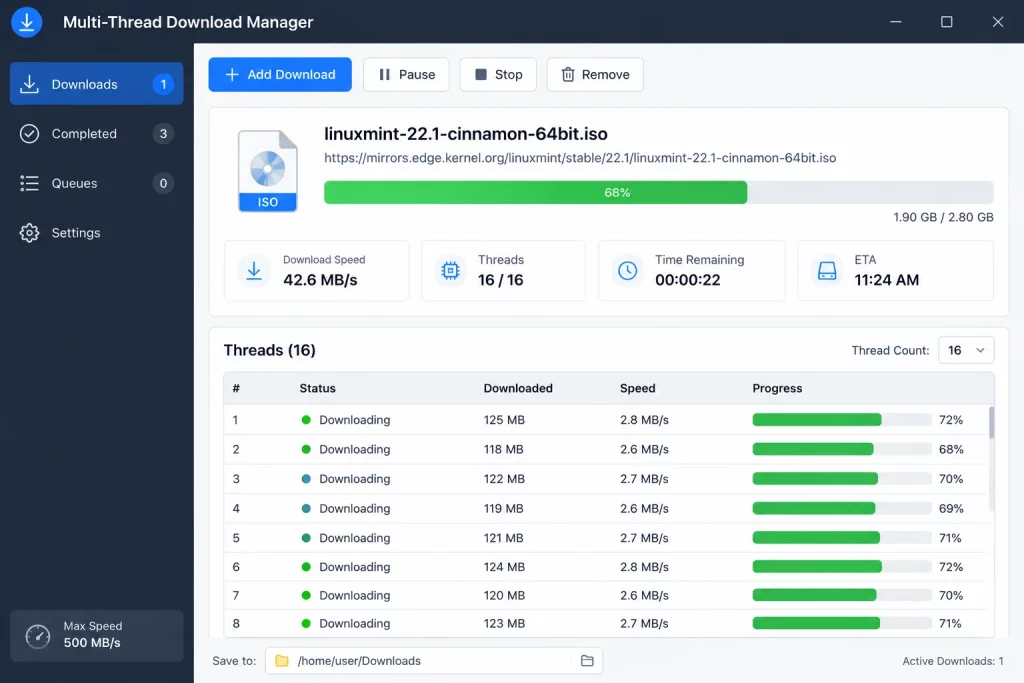
When dealing with large installation files on HTTP/HTTPS-only servers, using a default browser often risks connection drops midway.
- Use Aria2: An open-source command-line tool supporting multi-connection downloads and automatically connecting to multiple mirrors simultaneously, delivering download speeds comparable to P2P.
- Use Download Managers: Tools like Free Download Manager (FDM) or uGet split files for downloading, supporting pause and resume features when networks are unstable.
Check License Openness Before Creating Your Own Torrent
If you want to share files with the community or assist with redistribution:
- Check source code license: Ensure the project uses open licenses such as GPL, MIT, Apache 2.0, or Creative Commons that permit unlimited redistribution.
- Attach official checksums: When creating personal torrents to support the community, always attach links pointing to the project’s official
SHA256SUMSfile so other downloaders can verify it themselves.
FAQ
Does a high seeder count on a public tracker prove the torrent is official?
No. A high seeder count only reflects the file’s popularity on the P2P network and does not prove its origin or safety. Malicious actors can seed large malware packages and inflate seeder counts artificially. You must verify the SHA-256 hash against the official project website.
How can I tell if a Magnet link on a forum was provided by the official development team?
Official Magnet links will point to dedicated trackers operated by the project (e.g., containing tr=https%3A%2F%2Ftorrent.ubuntu.com) or be posted directly by a Verified Maintainer account. If the link points to anonymous trackers of unknown origin, verify the downloaded file using the official checksum.
If an ISO file downloaded via torrent matches the SHA-256 hash on the official website, is it 100% safe?
Yes. Mathematically and cryptographically, a SHA-256 hash is unique to a specific dataset. If the hash of your downloaded file matches the SHA256SUMS file from the official HTTPS website, the file is 100% authentic and untampered.
Can I create my own torrent to share with the community if the project doesn’t provide one?
Yes, provided that the open-source project’s license allows redistribution. However, when sharing, clearly state that it is a Community Mirror torrent and instruct users on how to verify the SHA-256 checksum with the official homepage for transparency.