
A search result may show that a movie is available on Netflix, Prime Video, Apple TV, or another OTT service, yet the destination page has no Play button. It may instead offer a rental, request another subscription, or state that the title is unavailable in your region.
This does not always indicate a broken link. Search services, streaming guides, and OTT platforms perform different functions. Google and JustWatch help users find possible viewing options, while the provider makes the final playback decision based on its current catalog, the user’s location, account, plan, device, and entitlement.
Google’s movie results can display several watch options for one title. Selecting an option opens the relevant provider, where the user must still meet that service’s access conditions.
Reasons Why a Movie Is Marked as “Available” in Search Results but Unplayable on OTT Platforms
When a search card names a provider, it usually means the provider has been associated with that title in the selected market or viewing model. It is not a guarantee that every user can press Play immediately.
Data Indexing Latency: Search engines and streaming guides depend on crawled pages, provider metadata, catalog feeds, and other availability information. If a license ends, a product page changes, or a provider updates its offer, an external listing may temporarily fall behind the provider’s own catalog.
There is no standard delay of several days or weeks. Updates may appear quickly, while some outdated entries remain longer. JustWatch acknowledges that availability varies by region and can change over time.
Geographic Copyright Restrictions (Geoblocking): Streaming rights are often licensed by territory. A service may carry a movie in one country but not another, even when both users have the same subscription tier.
Netflix lists unavailable regional rights as one reason a movie may be missing. It also notes that a title may not yet have been released in the viewer’s country.
A search result should not be described as automatically using “global availability data.” Google and streaming guides can localize results, but mismatches still occur when the detected country is wrong, the user is traveling, a VPN is active, or the underlying catalog has changed.
Ambiguous Distribution Models (SVOD vs. TVOD vs. AVOD): “Available” does not necessarily mean included in a subscription.
The title may be offered through:
- Subscription video on demand
- A separate channel subscription
- Digital rental
- Digital purchase
- Free ad-supported streaming
- A limited trial or promotional offer
JustWatch separates providers into subscription, buy or rent, and free options. A provider badge without the corresponding access type can therefore create the wrong expectation.
Apple TV can also present several ways to watch one movie, including playback through another app, purchase, or rental.
Why Do OTT Platforms Keep Displaying Movie Titles Even When They Cannot Be Played?
An unplayable title page does not prove that the platform is deliberately trying to mislead users. The page may remain because the service maintains one catalog record for search, watchlists, recommendations, regional offers, purchases, and future availability.
Search Engine Optimization (SEO): A stable page can continue to provide the film’s title, cast, synopsis, trailer, rating, and viewing options. However, there is no universal evidence that every OTT service preserves unavailable pages primarily to capture search traffic.
Content Recommendations & User Retention: A title page may show related movies when the requested film is unavailable. This gives users another way to browse the catalog, but recommendations may also exist because the service uses one standard interface for available and unavailable titles.
Cross-Selling & Upselling Opportunities: Some pages show several legitimate access routes. A movie may not be included in the user’s existing subscription but may be available through a premium channel, rental, or purchase.
An upgrade prompt is relevant only when a higher plan or add-on actually includes the movie. In other cases, the title may remain completely unavailable in that country.
Step-by-Step Guide to Verifying Where the Movie You Want to Watch Is Currently Available
The safest approach is to identify the exact release, set the correct country, distinguish subscription access from rental or purchase, and confirm the offer on the provider’s own page.
1. Look Up Movie Streaming Rights via Specialized Aggregator Apps
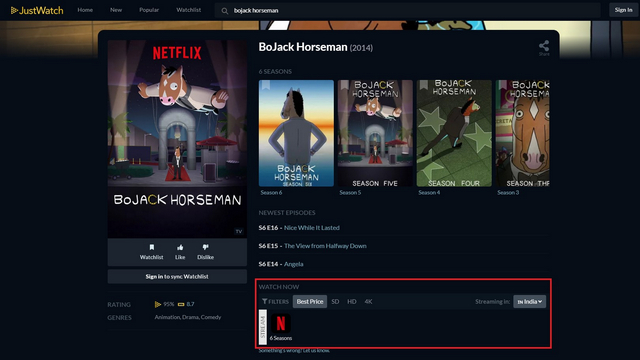
Search the exact title on JustWatch or another established streaming guide. Confirm the release year because remakes, sequels, and films with translated titles are easily confused.
Select the country where you are physically located and review the access category:
- Stream with subscription
- Rent
- Buy
- Free with ads
- Separate channel or add-on
JustWatch describes itself as a streaming guide that shows where movies and television programs can be watched. Its provider filters distinguish subscriptions from transactional and free offers.
Treat an aggregator result as a current lead rather than final proof. Open the provider’s page and check the title, year, price, plan requirement, audio options, and availability before subscribing or paying.
2. Verify Country and Region Settings on Your OTT Account and App
Check which country the service currently detects. Account country, payment profile, present network location, travel status, and provider rules may affect the catalog differently.
Do not assume that changing the App Store or Google Play country will change the OTT library. Many services use their own account and location systems.
For Netflix, an incorrect detected country can be caused by a VPN or proxy. Netflix recommends checking the network’s reported country and disabling the VPN when it does not match the user’s physical location.
Also review:
- Whether you are signed into the correct account
- Whether the movie requires another plan or channel
- Profile maturity restrictions
- Parental blocks
- Whether the title is a rental or purchase already connected to another account
Netflix notes that profile maturity settings and blocked titles can make content disappear from search even when regional rights are available.
3. Clear App Cache or Reinstall the Application
Use technical troubleshooting only after confirming that the movie should currently be playable for your country and account.
First try:
- Closing and reopening the app
- Signing out and signing back in
- Restarting the device
- Updating the app
- Restarting the network equipment
- Clearing cached app data where the device supports it
Reinstalling may fix damaged local data or an outdated interface, but it cannot restore a title whose license has expired or make a regional catalog available.
Netflix distinguishes regional unavailability from playback errors caused by network problems or data stored on the device. The correct fix depends on the error shown. citeturn647546search36turn647546search43
Alternative Workarounds to Watch Movies Marked as “Unavailable”
1. Use Virtual Private Networks (VPNs) to Access Foreign Catalogs
A VPN is not a reliable solution for streaming-catalog mismatches. It may cause the service to detect the wrong country or restrict the available library.
Netflix states that VPN users may see only titles for which it has worldwide rights and recommends turning the VPN off to regain access to the normal regional catalog.
Do not assume that connecting to another country grants permission to view that country’s licensed catalog. Review the provider’s current terms and applicable local rules. No specific VPN brand guarantees access.
2. Switch to Digital Purchases or Rentals (Digital Buy/Rent – VOD)
Check whether the film is available as a legal rental or purchase through Apple TV, Google TV, YouTube, Amazon Prime Video, or another regional store.
Read the conditions before paying:
- How long you have to start a rental
- How long playback remains available after starting
- Supported quality and devices
- Required account region
- Whether offline downloads are supported
Apple states that media-service availability varies by country and that some regions do not support the same movies, purchases, rentals, or subscriptions.
A digital “purchase” should not be described as permanent ownership of the underlying film. It normally grants access under the store’s license terms. Apple warns that purchased content can occasionally become unavailable if it loses the right to provide it, while Amazon describes digital access as a limited license.
3. Purchase Physical Media (DVD/Blu-ray) or Borrow from Libraries
A DVD, Blu-ray, or 4K UHD disc provides greater control than relying entirely on a changing subscription catalog. It can remain playable without the title staying licensed to an OTT library.
Physical media is not an absolute guarantee. Buyers must consider:
- Disc region compatibility
- Supported players and television formats
- Disc condition
- Availability of subtitles and dubbing
- Whether the release is official
Disc video often uses a higher bitrate than heavily compressed streaming, but quality depends on the specific disc master, streaming service, connection, and playback equipment. Physical media should not automatically be described as superior in every case.
Libraries, university collections, and legitimate rental services may provide another legal option without requiring a permanent purchase.
4. Build a Personal Media Server (Plex Media Server)
Plex, Jellyfin, and Emby can organize media files that the user has a lawful right to store and play. They do not provide rights to copy protected discs, download unauthorized files, or bypass streaming licenses.
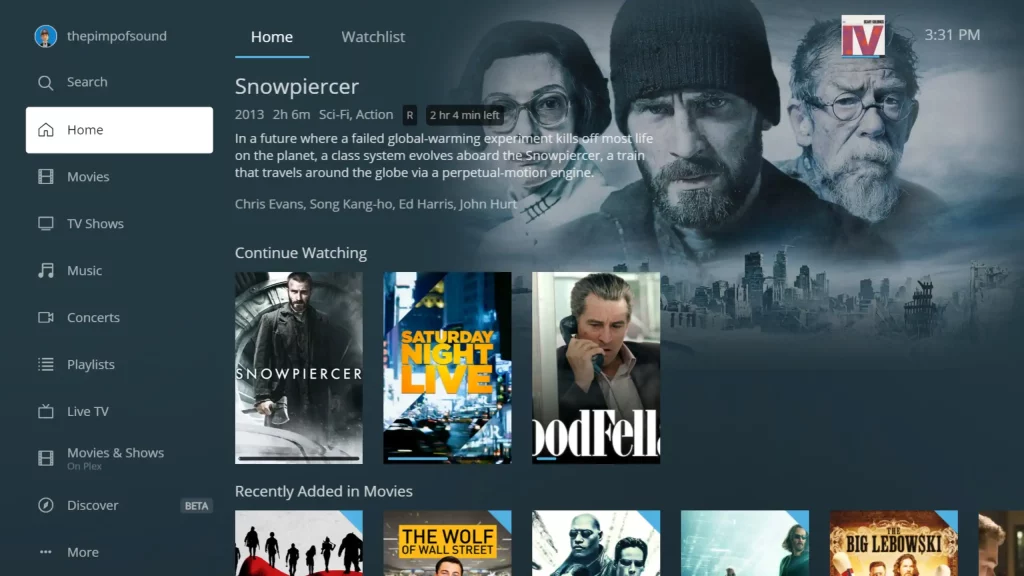
Plex Media Server allows users to add personal media to libraries and play it on compatible devices. Remote playback can require additional setup or an eligible Plex plan.
A personal server reduces dependence on subscription-catalog changes only when the underlying files remain legally available to the user. It also requires storage, backups, network security, and compatible playback hardware.
A movie appearing in search while remaining unplayable usually reflects a difference between discovery metadata and the provider’s final access check. Regional rights, account restrictions, plan requirements, rental terms, outdated listings, or technical app errors can all produce a similar result.
Confirm the country and viewing model first, then open the official provider page. When the title is genuinely unavailable, check legal rentals, purchases, physical releases, libraries, or a lawfully maintained personal collection instead of relying on a VPN or an unverified streaming site.